
 English
 العربية
 বাংলা
বাংলা
 Deutsch
 Español
 Français
 Italiano
 Português
 Русский
 Türkçe
 Tiếng Việt

YouTube Money Calculator
Calculate YouTube estimated revenue by daily views and CPM – free and easy to use






Estimate Your YouTube Earnings Instantly
The YouTube Money Calculator is a fast, free, and accurate online tool that helps you estimate how much money your YouTube channel can earn. Whether you are a beginner YouTuber or an experienced content creator, understanding your potential revenue is essential for planning and growth.
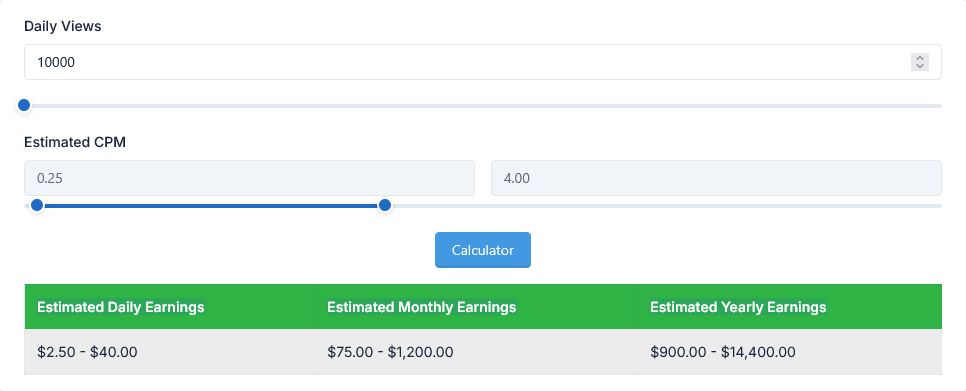
By entering your average daily views and estimated CPM (Cost Per Mille – earnings per 1,000 views), this tool instantly calculates your estimated daily, monthly, and yearly YouTube earnings. No signup, no complicated formulas – just real-time revenue estimates.
How to Use the YouTube Money Calculator
- Enter your Daily Views (average views your channel gets per day)
- Enter your Estimated CPM (typical YouTube CPM ranges from $1 to $10+ depending on niche and audience)
- Click the Calculate button
- View your estimated earnings instantly
What You Will Get
This tool provides a complete breakdown of your estimated YouTube revenue:
- Estimated Daily Earnings – How much you can earn per day
- Estimated Monthly Earnings – Projected revenue for 30 days
- Estimated Yearly Earnings – Projected revenue for 365 days
All calculations are based on the formula: (Daily Views ÷ 1000) × CPM
Why Use a YouTube Money Calculator?
Many new YouTubers are unsure about their earning potential. This tool removes the guesswork and gives you a clear estimate based on real CPM values. Understanding your estimated earnings helps you:
- Plan your content strategy better
- Set realistic income goals
- Track growth and revenue potential
- Compare different niches and CPM rates
Who Should Use This Tool?
- YouTubers and Content Creators – Estimate potential revenue from your channel
- Digital Marketers – Calculate ROI for YouTube advertising and campaigns
- Aspiring YouTubers – Understand earning potential before starting
- Social Media Managers – Forecast revenue for client channels
- Freelance Video Editors – Negotiate better rates by understanding channel earnings
Understanding CPM (Cost Per Mille)
CPM is the amount advertisers pay per 1,000 ad views on your video. YouTube CPM varies widely based on:
- Niche – Finance, tech, and business niches typically have higher CPM
- Audience Location – Viewers from US, UK, Canada, and Australia generally generate higher CPM
- Seasonality – CPM often increases during Q4 (holiday season)
- Video Length & Ad Type – Longer videos with mid-roll ads earn more
Typical CPM ranges from $1 to $10+. Beginners can expect around $1–$3, while established channels in high-value niches can earn $10–$20 or more per 1,000 views.
Example Calculation
Let's say your channel gets 10,000 daily views and your CPM is $5:
- Daily Earnings: (10,000 ÷ 1,000) × $5 = $50
- Monthly Earnings: $50 × 30 = $1,500
- Yearly Earnings: $50 × 365 = $18,250
Use our calculator to get your personalized estimate instantly!
Key Features
- Estimate YouTube earnings by daily views and CPM
- Instant daily, monthly, and yearly revenue calculations
- Free to use with no signup required
- Simple and user-friendly interface
- Works on mobile, tablet, and desktop
Related Tools
- YouTube Channel Statistics
- YouTube Video Statistics
- YouTube Tag Generator
- YouTube Hashtag Generator
- YouTube Title Generator
Frequently Asked Questions
What is CPM in YouTube?
CPM stands for Cost Per Mille, meaning the amount advertisers pay per 1,000 ad views on your video.
Is this YouTube Money Calculator free?
Yes, it is completely free and does not require any registration or login.
How accurate are the estimates?
Estimates are based on the CPM and views you enter. Actual earnings may vary due to factors like ad type, viewer location, and YouTube's revenue share.
What CPM should I use?
CPM varies by niche. Beginners can use $1–$3, while established channels often use $5–$10. Research your niche for more accurate estimates.
Does YouTube pay for all views?
No, only monetized views (views where ads are shown) count toward earnings. This calculator assumes all views are monetized.
Can I use this tool for multiple channels?
Yes, you can use the calculator as many times as you want for different channels or scenarios.
Tips to Increase Your YouTube Earnings
- Create longer videos (8+ minutes) – Allows mid-roll ads for more revenue
- Focus on high-CPM niches – Finance, tech, real estate, and business topics pay more
- Target audiences from high-value countries – US, UK, Canada, Australia
- Improve your click-through rate (CTR) – Better titles and thumbnails = more views
- Increase watch time and engagement – YouTube promotes videos that keep viewers watching
Conclusion
The YouTube Money Calculator is an essential tool for any YouTuber who wants to understand their earning potential. By entering your daily views and estimated CPM, you can instantly see your projected daily, monthly, and yearly revenue. Use this data to set realistic goals, plan your content strategy, and grow your YouTube channel with confidence.
Start calculating your YouTube earnings now – it's free and takes only a few seconds!
