
 English
 العربية
 বাংলা
বাংলা
 Deutsch
 Español
 Français
 Italiano
 Português
 Русский
 Türkçe
 Tiếng Việt

Case Converter
Convert text into different letter cases instantly with one click





Case Converter – Convert Text to Uppercase & Lowercase Instantly
The Case Converter Tool helps you change text into different letter cases instantly. You can convert text into uppercase, lowercase, sentence case, or capital case with one click. It is fast, simple, and very useful for writing and formatting.
What is Case Converter
The case converter is an online tool that changes the format of text. It adjusts letter cases to match your needs. It saves time and removes manual editing errors.
How to Use
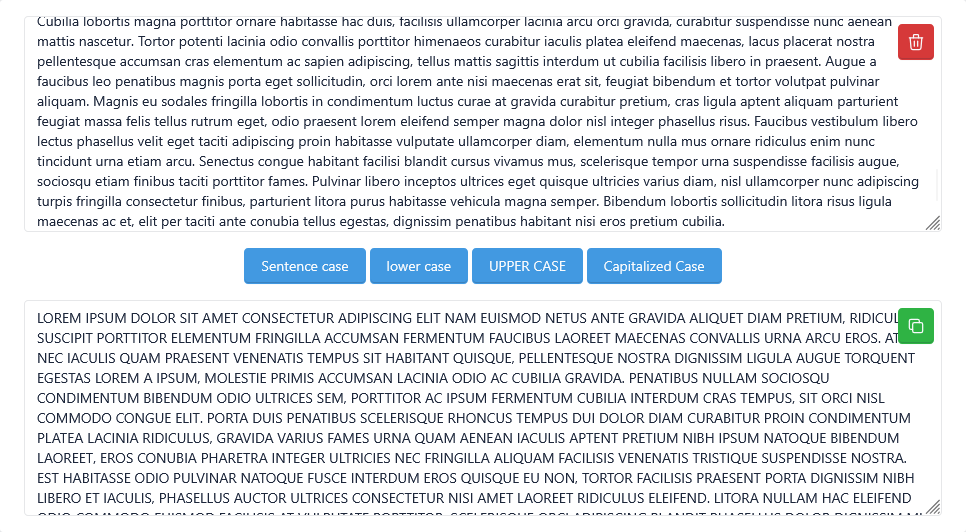
- Enter your text in the input box
- Select the desired case:
- Sentence Case
- Lower Case
- Upper Case
- Capital Case
- Click on the convert button
- View the result in the output box
- Copy the result easily
Example
Input:
- hello world from seo tool
Output:
- Sentence Case: Hello world from seo tool
- Upper Case: HELLO WORLD FROM SEO TOOL
- Lower Case: hello world from seo tool
- Capital Case: Hello World From Seo Tool
Why Use This Tool
This case converter tool helps you format text quickly. It saves time and ensures consistency in writing.
How This Tool Helps You
This tool helps writers format content, helps students correct text, and helps developers clean data. It improves readability and presentation.
Key Features
- Instant text case conversion
- Supports multiple case formats
- Accurate and fast results
- Copyable output
- Simple and user-friendly interface
- Works on mobile and desktop
- No installation required
- Free online tool
Who Should Use This Tool
- Writers
- Students
- Bloggers
- Developers
- Content creators
- Editors
Related Tools
FAQs
1. What is a Case Converter?
It is a tool that changes text into different letter cases like uppercase or lowercase.
2. What is sentence case?
Sentence case means only the first letter of a sentence is capitalized.
3. Is this case converter tool free?
Yes, it is completely free and works online.
4. Can I copy the result?
Yes, you can easily copy the converted text from the output box.
Final Thoughts
The case converter tool is simple, fast, and very useful. It helps you format text instantly. Try it now and improve your writing workflow.
