
 English
 العربية
 বাংলা
বাংলা
 Deutsch
 Español
 Français
 Italiano
 Português
 Русский
 Türkçe
 Tiếng Việt

Image Resizer
Resize, crop, rotate, flip, and convert images with preview and download
Resize Image




Resize Image Online Instantly
The Image Resizer is a powerful and free online tool that helps you resize image easily. You can upload an image or use a remote URL, adjust size, crop, rotate, flip, and convert formats in one place.
This all-in-one tool is perfect for designers, developers, and content creators.
What is Image Resizer?
An Image Resizer is a tool that allows you to change the dimensions, size, and format of an image. It also includes editing features like cropping, rotating, and flipping.
This helps optimize images for websites, social media, and printing.
How to Use Image Resizer Tool
- Upload your image (maximum size: 5 MB) or use a remote URL
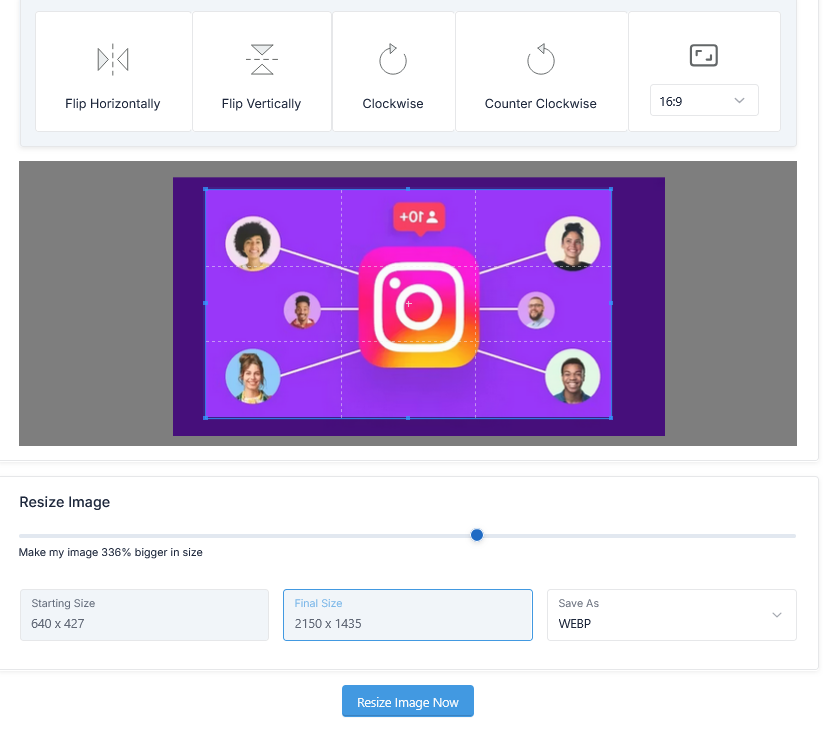
- Select editing options:
- Flip Horizontally / Vertically
- Rotate Clockwise / Counter Clockwise
- Select crop area and size:
- Freeform
- 16:9
- 4:3
- 1:1
- 2:3
- Adjust size using slider (up to 500%)
- Select output format:
- JPG, PNG, GIF, BMP, WEBP
- Click Resize Image Now
- Preview the result
- Download the resized image
Why Use Image Resizer?
Images need proper sizing for performance and design. The Image Resizer makes this process simple and efficient.
- Resize image to any dimension
- Increase size up to 500%
- Crop unwanted areas
- Rotate and flip images
- Convert image formats easily
In addition, optimized images improve website speed and user experience.
All-in-One Image Editing Features
This Image Resizer is more than just resizing. It includes multiple tools in one interface.
- Resize image with slider control
- Crop with preset ratios
- Flip and rotate images
- Convert formats (JPG, PNG, WEBP, etc.)
This saves time and eliminates the need for multiple tools.
How This Tool Helps You
This Image Resizer simplifies image editing workflow.
- Edit images in one place
- Resize image instantly
- Preview before download
- Optimize images for web and social media
Key Features of Image Resizer Tool
- Resize image up to 500%
- Supports multiple formats (JPG, PNG, GIF, BMP, WEBP)
- Crop with custom and preset ratios
- Flip and rotate options
- Supports upload and remote URL
- High-quality output
- Preview before download
- No signup required
Who Should Use This Tool?
- Graphic designers
- Photographers
- Web developers
- Social media creators
- Students and professionals
Related Tools
Frequently Asked Questions
What is image resizing?
It is the process of changing the dimensions of an image.
Is this Image Resizer tool free?
Yes, it is completely free.
Can I convert image formats?
Yes, you can save images in JPG, PNG, GIF, BMP, or WEBP.
Can I resize without losing quality?
The tool maintains quality, but extreme resizing may slightly affect sharpness.
Final Thoughts
The Image Resizer is an all-in-one solution to resize image, crop, rotate, flip, and convert formats. It provides powerful features, high-quality output, and fast performance.
Use this tool now to resize and optimize your images effortlessly.
