
 English
 العربية
 বাংলা
বাংলা
 Deutsch
 Español
 Français
 Italiano
 Português
 Русский
 Türkçe
 Tiếng Việt

YouTube Channel Banner Downloader
Extract and download YouTube channel banners (cover photos) in original high resolution






Download YouTube Channel Banners Instantly
The YouTube Channel Banner Downloader is a fast, free, and easy-to-use online tool that allows you to extract and download channel banners (also known as channel art or cover photos) from any YouTube channel. Whether you need a channel banner for design inspiration, competitor analysis, content research, or branding purposes, this tool provides instant access to high-quality banner images.
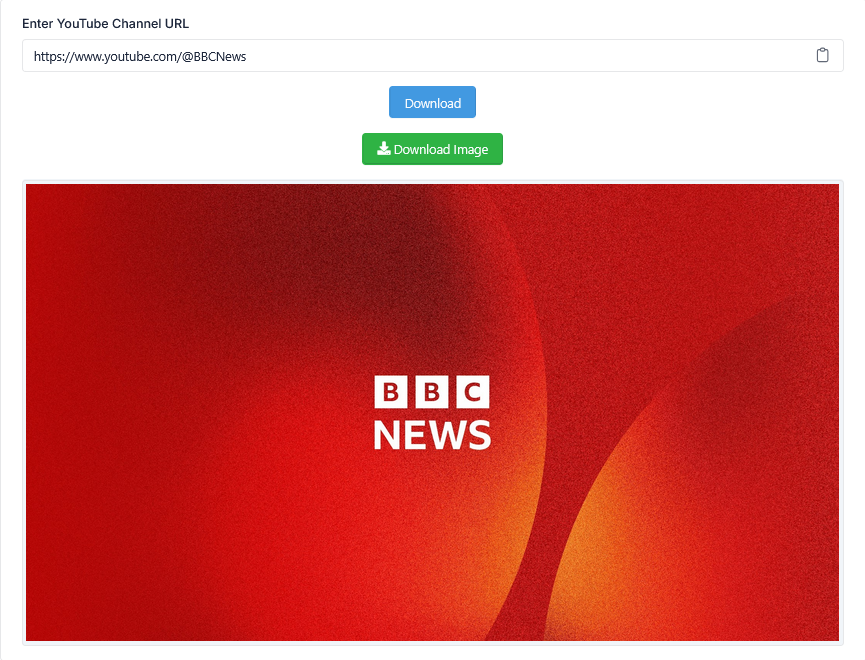
Simply enter a YouTube channel URL, click the Download button, and the tool will fetch the channel's banner image in its original high resolution. You can preview the banner before downloading and save it with one click.
How to Use the YouTube Channel Banner Downloader
- Copy the YouTube channel URL (e.g., https://www.youtube.com/@ChannelName or https://www.youtube.com/channel/UCxxxxxx)
- Paste the link into the input box
- Click the Download button
- Preview the channel banner image
- Click the Download Image button to save the banner to your device
What is YouTube Channel Banner Downloader?
A YouTube Channel Banner Downloader is an online utility that extracts the channel banner (also called channel art, cover photo, or header image) from any YouTube channel. YouTube channel banners are the large background images that appear at the top of a channel page. They are essential for channel branding and visual identity.
This tool is perfect for:
- Downloading your own channel banner for backup or branding purposes
- Analyzing competitor channel banners for design inspiration
- Researching content creators and their visual branding strategies
- Saving channel banners for presentations, reports, or social media
What Size Are YouTube Channel Banners?
YouTube channel banners have specific size requirements for optimal display across different devices. This tool downloads banners in their original uploaded resolution, typically:
- Recommended Size: 2560 x 1440 pixels (16:9 aspect ratio)
- Minimum Size: 2048 x 1152 pixels
- Safe Area for All Devices: 1546 x 423 pixels (center area visible on all screens)
- File Format: JPG, PNG, GIF, or BMP (downloaded as JPG/PNG)
The tool downloads the banner in its original quality, ensuring you get the best possible resolution for your needs.
Why Use a YouTube Channel Banner Downloader?
Manually saving channel banners often requires taking screenshots, inspecting page source code, or using complex browser extensions. This tool eliminates that complexity and provides direct, high-quality downloads in seconds.
- Save Time: Get channel banners instantly without manual work
- High Quality: Download banners in original resolution (up to 2560x1440)
- No Technical Skills: Simple copy-paste interface
- Preview Before Download: See the banner before saving
- Completely Free: No signup, no hidden charges
Who Should Use This Tool?
- YouTube Content Creators – Download your own channel banner for backup or redesign
- Digital Marketers – Analyze competitor branding and visual identity strategies
- Social Media Managers – Collect channel banners for reports and presentations
- Graphic Designers – Use channel banners as design references or inspiration
- Researchers & Analysts – Study creator branding trends across YouTube
Key Features
- Download YouTube channel banners in original high resolution (2560x1440)
- Instant preview before downloading
- Works with any public YouTube channel URL
- No registration or signup required
- Fast, accurate, and easy to use
- Mobile-friendly and works on all devices
- PNG/JPG format with original quality preserved
Understanding YouTube Channel Banners
YouTube channel banners (also called channel art) are the large header images displayed at the top of every YouTube channel page. They are a critical part of channel branding and help creators make a strong first impression.
Why Channel Banners Are Important:
- Creates a professional and branded channel appearance
- Communicates channel identity and niche at a glance
- Helps attract new subscribers and build trust
- Provides opportunities to showcase social media handles, upload schedules, or taglines
Design Tips for YouTube Channel Banners:
- Keep important text and logos within the safe area (1546 x 423 pixels)
- Use high-resolution images to avoid pixelation
- Incorporate your brand colors and style consistently
- Update your banner regularly to reflect new content or seasons
Example Use Cases
Example 1 – Content Creator: You want to redesign your channel banner but lost the original file. Use this tool to download your current banner as a backup before making changes.
Example 2 – Marketer: You are researching competitor channels in your niche. Use the tool to download their banners and analyze their visual branding strategies.
Example 3 – Designer: You need reference images for a client project. Use the tool to collect channel banners from top creators in the same industry.
Example 4 – Researcher: You are studying branding trends on YouTube. Use the tool to download and compare banners from hundreds of channels.
Related Tools
- YouTube Channel Logo Downloader
- YouTube Channel Statistics
- YouTube Thumbnail Downloader
- YouTube Channel ID Finder
- YouTube Tag Extractor
Frequently Asked Questions
What is a YouTube Channel Banner Downloader?
It is a tool that extracts and downloads the channel banner (channel art/cover photo) from any public YouTube channel in original high resolution.
Is this tool free?
Yes, the YouTube Channel Banner Downloader is completely free and requires no registration or signup.
What size are YouTube channel banners?
The recommended size is 2560 x 1440 pixels. The tool downloads banners in their original uploaded resolution.
What format are the downloaded banners?
Banners are downloaded in JPG or PNG format, preserving original quality.
Can I download banners from any YouTube channel?
Yes, you can download banners from any public YouTube channel using its channel URL.
Do I need to create an account?
No, this tool works instantly without any account or login.
Can I preview the banner before downloading?
Yes, the tool displays a preview of the banner so you can see it before saving.
Tips for Using YouTube Channel Banners
- For Creators: Always keep a backup of your channel banner. Use high-resolution images for best quality.
- For Marketers: When analyzing competitors, pay attention to banner design, messaging, and calls-to-action.
- For Designers: Use downloaded banners as reference points, but always create original artwork for clients.
- For Researchers: Track how channel banners evolve over time to understand branding trends and seasonality.
Conclusion
The YouTube Channel Banner Downloader is an essential tool for anyone who needs quick access to YouTube channel banners. Whether you are a content creator backing up your own banner, a marketer researching competitors, a designer seeking inspiration, or a researcher studying branding trends, this tool provides instant, high-quality downloads in original resolution.
Try it now – enter any YouTube channel URL and download the banner in high quality, completely free!
