
 English
 العربية
 বাংলা
বাংলা
 Deutsch
 Español
 Français
 Italiano
 Português
 Русский
 Türkçe
 Tiếng Việt

Find Facebook ID
Enter a Facebook profile link and instantly get the numeric Facebook ID with profile preview





Find Facebook ID Instantly from Profile Link
The Find Facebook ID tool helps you quickly extract the numeric Facebook ID from any profile URL. Just paste the link, click the button, and get instant results along with the profile picture.
This tool works fast, requires no login, and provides accurate results every time.
What is Find Facebook ID Tool?
The Find Facebook ID tool is a free online utility that converts a Facebook username or profile link into its unique numeric ID. Every Facebook account has a hidden ID, and this tool reveals it instantly.
This ID is useful for developers, marketers, and advanced users.
How to Use Find Facebook ID Tool
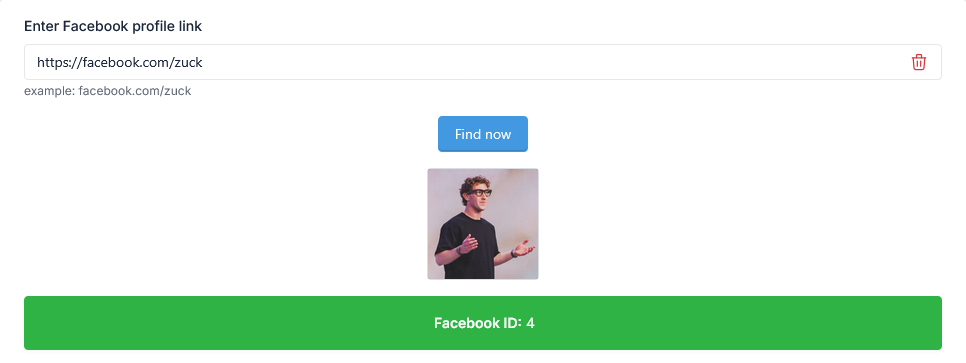
- Enter a Facebook profile link (example: https://facebook.com/zuck)
- Click the Find Now button
- View the profile picture instantly
- Get the Facebook ID in the result box
- Copy the ID for your use
What You Will Get
Our Find Facebook ID tool gives you:
- Facebook Profile Picture
- Numeric Facebook ID
- Instant and accurate results
Why You Need Facebook ID
Many Facebook features and integrations require a numeric ID instead of a username. That’s why using a Find Facebook ID tool becomes essential.
- Use in Facebook apps and APIs
- Track profile data in tools
- Manage ads and marketing campaigns
- Work with developer integrations
How This Tool Helps You
This tool removes the complexity of finding hidden IDs and gives you instant results.
- Convert username to Facebook ID
- Access profile data easily
- Save time with quick lookup
- Improve workflow for developers
Key Features
- Instant Facebook ID extraction
- Displays profile picture preview
- Simple and fast process
- Accurate results
- No login required
- Free to use
Who Should Use This Tool?
- Web developers
- Digital marketers
- Social media managers
- Advertisers
- General Facebook users
Example
If you enter:
https://facebook.com/zuck
The tool will show:
- Profile picture
- Facebook ID (numeric value)
Important Note
The Find Facebook ID tool only works with publicly accessible profiles. It does not access private data and respects user privacy.
Related Tools
Frequently Asked Questions
What is a Facebook ID?
It is a unique numeric identifier assigned to each Facebook profile.
Is this tool free?
Yes, the Find Facebook ID tool is completely free.
Do I need to log in?
No, you can use this tool without logging in.
Can I find any profile ID?
Yes, as long as the profile is publicly accessible.
Final Thoughts
The Find Facebook ID tool is a quick and reliable way to extract numeric IDs from Facebook profile links. It simplifies your work and saves time with instant results.
Try it now and get your Facebook ID in seconds.
