
 English
 العربية
 বাংলা
বাংলা
 Deutsch
 Español
 Français
 Italiano
 Português
 Русский
 Türkçe
 Tiếng Việt

YouTube Tag Generator
Generate Best Tags for YouTube Videos






YouTube Tag Generator – Generate Best Tags for YouTube Videos (Free)
Welcome to the YouTube Tag Generator by OnlineToolZone.com – a completely free tool that helps you find the most relevant, high-ranking tags and keywords for your YouTube videos. Whether you're a beginner or a seasoned creator, using the right tags is essential to get more views, improve search rankings, and grow your channel.
What is the YouTube Tag Generator?
The YouTube Tag Generator is an intelligent online tool that suggests optimized tags based on your video topic or main keyword. It analyzes YouTube's search algorithm and trending patterns to recommend tags that can help your video appear in search results, suggested videos, and related content sections.
Why Are YouTube Tags Important for SEO?
YouTube tags help the platform understand the content and context of your video. Properly optimized tags can:
- Improve your video's visibility in YouTube search results
- Help YouTube recommend your video to the right audience
- Increase click-through rates (CTR) and watch time
- Boost your channel's overall SEO performance
Without relevant tags, even great videos may remain undiscovered. Our tag generator ensures you never miss out on valuable keywords.
How to Use Our YouTube Tag Generator Tool
Using our tool is simple and takes less than 30 seconds. Follow these steps:
Step 1: Enter Your Video Topic or Keyword
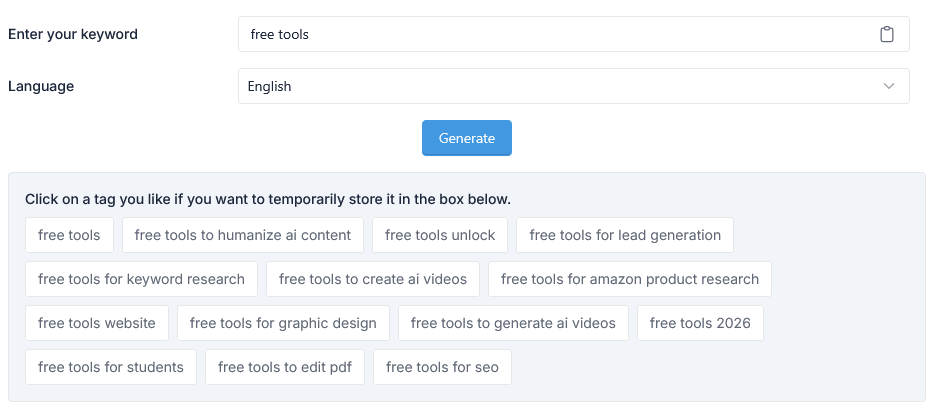
Type the main topic, keyword, or phrase related to your YouTube video into the input box above. For example: "cooking pasta", "phone review", or "workout for beginners".
Step 2: Select "Language"
Select your desired Language from dropdown menu. Default: English
Step 2: Click "Generate Tags"
Press the generate button. Our tool will instantly process your keyword and provide a list of relevant YouTube tags.
Step 3: Copy and Paste Tags into YouTube
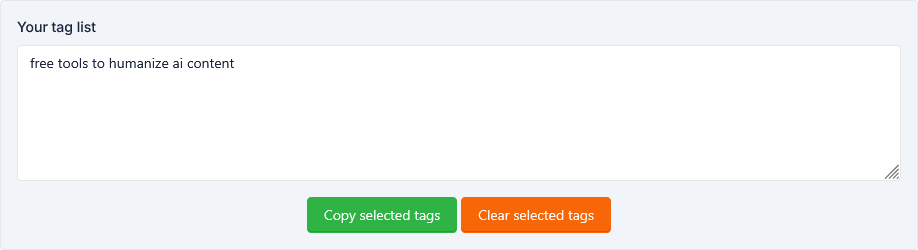
Copy the generated tags and paste them directly into the "Tags" field when uploading or editing your YouTube video. You can also use them for video descriptions and titles.
Key Features of Our YouTube Tag Generator
- 100% Free to Use: No signup, no hidden fees, no credit card required.
- Instant Tag Generation: Get relevant tags in seconds.
- SEO-Optimized Suggestions: Tags are selected based on YouTube's ranking factors.
- No Registration Needed: Use the tool directly from your browser.
- Mobile Friendly: Works perfectly on smartphones, tablets, and desktops.
- Regular Updates: Our algorithm is frequently updated to reflect current YouTube trends.
Benefits of Using the Right YouTube Tags
- Higher Search Ranking: Tags help YouTube understand your content, improving your position in search results.
- More Views: Better tags = more impressions and clicks = more views.
- Targeted Audience: Reach viewers who are genuinely interested in your niche.
- Competitor Analysis: Generate tags similar to top-performing videos in your category.
Tips to Optimize Your YouTube Tags for More Views
- Use a Mix of Broad and Specific Tags: Combine general keywords (e.g., "cooking tips") with long-tail tags (e.g., "easy pasta recipes for beginners").
- Include Your Main Keyword in the First Few Tags: YouTube gives more weight to early tags.
- Avoid Irrelevant Tags: Misleading tags can hurt your channel's reputation and ranking.
- Analyze Competitor Tags: See what tags successful videos in your niche are using.
- Don't Overstuff Tags: Use 10–15 high-quality tags instead of 50 weak ones.
Frequently Asked Questions (FAQ)
Is this YouTube Tag Generator free?
Yes, absolutely. Our YouTube Tag Generator is completely free with no premium version or paywall. You can generate unlimited tags anytime.
Can I use generated tags for any YouTube video?
Yes. The tags generated are relevant to your provided keyword and can be used for any YouTube video, whether new or existing.
Do tags really help with YouTube ranking?
Yes. Tags are one of the key ranking factors on YouTube. While not the only factor, they significantly improve discoverability when used correctly.
How many tags should I use per video?
YouTube allows up to 500 characters for tags. We recommend using 10–15 relevant, high-quality tags. Avoid stuffing irrelevant tags.
Do I need to create an account to use this tool?
No. You can use our YouTube Tag Generator without registration or login. It's designed for instant, hassle-free access.
Start Growing Your YouTube Channel Today
Stop guessing which tags will work. Use our YouTube Tag Generator to get data-driven, SEO-friendly tags in seconds. Whether you're a vlogger, educator, gamer, or business owner, this tool will help your videos reach the right audience faster.
Try it now: Enter your keyword above and generate your first set of optimized YouTube tags – completely free!
