
 English
 العربية
 বাংলা
বাংলা
 Deutsch
 Español
 Français
 Italiano
 Português
 Русский
 Türkçe
 Tiếng Việt

Rotate Image
Rotate images clockwise or anti-clockwise with instant preview and download






Rotate Image Online Instantly
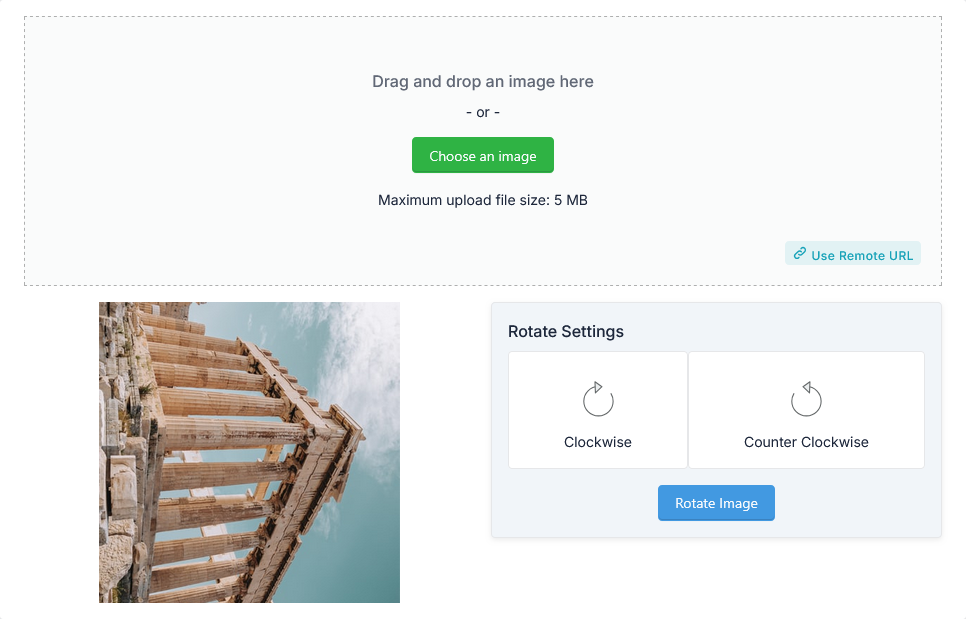
The Rotate Image tool is a fast and free online utility that helps you rotate image clockwise or anti-clockwise in seconds. You can upload an image or use a remote URL and download the rotated version instantly.
This tool is perfect for quick image corrections without using heavy editing software.
What is Rotate Image?
Rotate Image means turning an image at a specific angle, usually 90°, 180°, or 270°. It helps fix orientation issues and improve visual presentation.
This feature is widely used in photography, design, and web content creation.
How to Use Rotate Image Tool
- Upload your image (maximum size: 5 MB) or use a remote URL
- Select rotation direction:
- Rotate Clockwise
- Rotate Anti-Clockwise
- Click the Rotate Image button
- Download the rotated image instantly
Rotation Options Explained
- Rotate Clockwise – Turns the image to the right
- Rotate Anti-Clockwise – Turns the image to the left
You can apply rotation multiple times for different angles.
Why Use Rotate Image Tool?
Images often need rotation due to incorrect orientation. The Rotate Image tool makes this process simple.
- Fix image orientation
- Improve visual presentation
- Prepare images for websites
- Optimize images for social media
- Save time without software
In addition, it maintains image quality during rotation.
How This Tool Helps You
This Rotate Image tool simplifies image editing tasks.
- Rotate image instantly
- Supports clockwise and anti-clockwise rotation
- Works with uploaded images or URLs
- Provides quick download option
Key Features of Rotate Image Tool
- Rotate image clockwise or anti-clockwise
- Supports upload and remote URL
- Fast image processing
- High-quality output
- Supports up to 5 MB file size
- Easy-to-use interface
- No signup required
Who Should Use This Tool?
- Graphic designers
- Social media creators
- Web developers
- Content creators
- Students and professionals
Related Tools
Frequently Asked Questions
What does rotate image mean?
It means turning an image to adjust its orientation.
Is this Rotate Image tool free?
Yes, it is completely free.
Will image quality be affected?
No, the tool maintains high-quality output.
Can I rotate image multiple times?
Yes, you can apply rotation multiple times.
Final Thoughts
The Rotate Image tool is a simple and effective way to rotate image online. It provides fast results, high-quality output, and flexible options.
Use this tool now to rotate your images instantly and improve your visuals.
